











Aryson Google Chat Migration Tool for Windows
- Demo
- 4.7
- V26.1.0
Download for Windows
View an ad to download for free

- Aryson Technologies
- More programs (93)
Migrate Google Chat Messages, Spaces & Files to Microsoft Teams
Aryson Google Chat Migration Tool is designed to migrate Google Chat conversations, direct messages, group chats, and Spaces to Microsoft 365 or another Google Workspace environment. It helps organizations transfer business conversations and associated content while preserving important chat details, participant associations, and conversation metadata. The software offers user mapping, Space mapping, batch migration, authentication options, and detailed migration reports for managing individual accounts or large-scale organizational projects.
Migrate Google Chat Direct Messages and Spaces
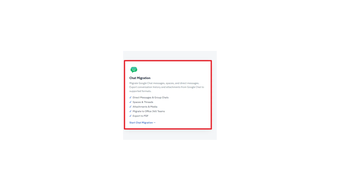
The tool supports the migration of Google Chat direct messages (DMs), group conversations, and Spaces. Users can review the available conversations and select the required data before starting the migration. This helps organizations transfer relevant communication records during platform changes, employee transitions, or workspace consolidation.
Transfer Messages and Shared Content
The software supports transferring chat messages and associated content, including emojis, GIFs, images, videos, files, links, and reactions. It can also migrate supported Google Drive files, Google Meet links, calendar invitations, and tasks associated with supported chat data.
Migrate Google Chat to Microsoft Teams
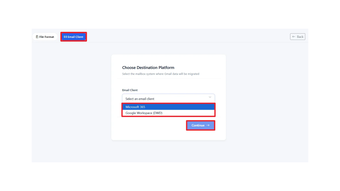
Aryson Google Chat Migration Tool supports migration to Microsoft 365, including Microsoft Teams and its channels. Users can map Google Chat Spaces to the appropriate Teams channels and map Google Chat participants to Microsoft 365 users. Existing Teams and channels can be reused when matching destinations are available.
Preserve Conversation Details
The software is designed to preserve chat metadata, conversation details, and participant associations during migration. Space memberships, direct-message participants, and group-chat participants can be handled through user mapping to help maintain the relationship between conversations and their participants.
Flexible User and Participant Mapping
The mapping options help administrators associate source users and chat participants with the correct destination accounts. CSV import and export support bulk user and participant mapping, reducing repetitive manual configuration when handling multiple users or a large number of conversations.
Export Google Chat to PDF
The tool allows users to export Google Chat conversations to PDF for offline access, recordkeeping, and archiving. Available PDF layouts include Tabular, Bubble, and Transcript formats, allowing users to select a presentation style suited to their requirements.
Migration Monitoring and Reports
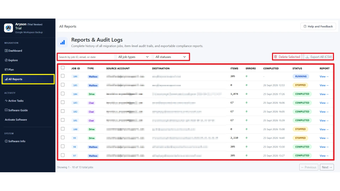
Users can review Spaces, direct messages, participants, and destination mappings before starting the process. Active Tasks and All Reports provide migration progress and details about messages, Spaces, DMs, skipped items, failed items, and transferred data. Migration summaries help administrators review the outcome of completed jobs.
Simple Migration Process
Launch Aryson Google Chat Migration Tool.
Connect the source Google account using a supported authentication method.
Review the available Spaces, direct messages, and group conversations.
Map source users and participants to the destination accounts.
Select Microsoft 365 or the target Google Workspace environment.
Review the destination mappings and start migration.
Monitor progress and review the final migration report.
Free Trial
The demo version allows users to evaluate the Google Chat migration process. It migrates the first 50 messages per channel, enabling users to test the workflow before purchasing the licensed version.
Compatibility
The tool is part of Aryson's Google Workspace migration solution, which is available for Windows, Mac, and Linux. Successful migration requires appropriate Google Workspace permissions and access to the selected destination platform.
Aryson Google Chat Migration Tool provides a focused solution for transferring Google Chat conversations, Spaces, participants, and supported shared content while offering destination mapping,
Loading…
App specs
Developer
- Aryson Technologies
- More programs (93)
License
Demo
Version
26.1.0
Latest update
Platform
Windows
OS
Windows 95
Language
English
Size
322.52 MB
Aryson Google Chat Migration Tool for PC
- Demo
- 4.7
- V26.1.0
Download for PC
View an ad to download for free
User reviews about Aryson Google Chat Migration Tool
Have you tried Aryson Google Chat Migration Tool? Be the first to leave your opinion!
Add reviewTop downloads Utilities & Tools for Windows
Top downloads Utilities & Tools for Windows
Top downloads Utilities & Tools for Windows
Related topics about Aryson Google Chat Migration Tool
Latest articles

Star Wars: Taika Waititi’s movie is now on ice

Bill Gates updates his warning: cyberattacks and bioweapons could kill billions

Logitech releases study: poor workplace tech is stressing employees out

OpenAI discloses research model used a stranger’s crypto wallet: it deployed testnet contracts

Apple has made “a big mistake” with the iPhone Duo, according to its lead analyst
Laws concerning the use of this software vary from country to country. We do not encourage or condone the use of this program if it is in violation of these laws. Softonic may receive a referral fee if you click or buy any of the products featured here.